
Introduction
Amazon EKS provides a powerful, managed Kubernetes control plane, but deploying production-grade ingress with AWS Application Load Balancers (ALB) requires multiple AWS and Kubernetes components to work together correctly.
In this post, I’ll walk through how I deployed NGINX on Amazon EKS using AWS Load Balancer Controller, and more importantly, share real-world issues and fixes I encountered during the process — including IAM permission gaps, OIDC misconfiguration, subnet tagging, and stuck Kubernetes finalizers.
This is not just a copy-paste guide; it reflects practical troubleshooting experience that many EKS users face in real environments.
Architecture Overview
High-level flow:
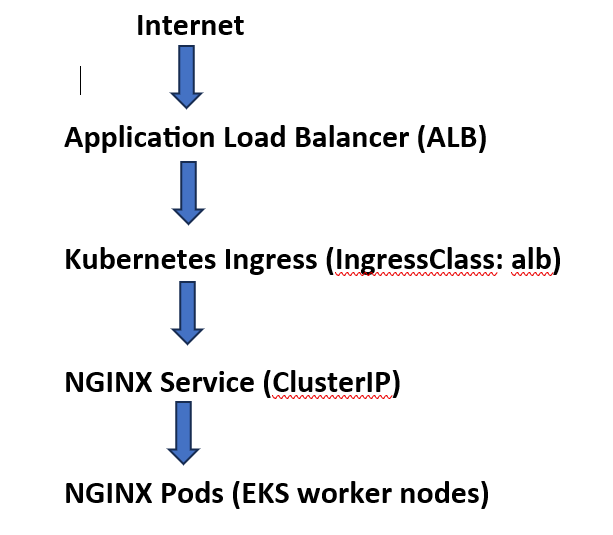
Key AWS integrations:
- AWS Load Balancer Controller
- IAM Roles for Service Accounts (IRSA)
- EKS OIDC Provider
- VPC public subnet tagging
Prerequisites
Before starting, I ensured the following:
- Amazon EKS cluster (
learn-eks) created usingeksctl - Worker nodes in public subnets
kubectl,aws, andhelmconfigured- AWS CLI authenticated with sufficient permissions
Step 1: Deploy a Sample NGINX Application
I deployed a simple NGINX workload and exposed it internally via a Service.
kubectl create deployment nginx –image=nginx
kubectl expose deployment nginx –port=80 –name=nginx-lb
This creates:
- NGINX pods
- A
ClusterIPservice (nginx-lb) as the backend for ALB
Step 2: Enable OIDC for the EKS Cluster (Critical)
AWS Load Balancer Controller relies on IRSA, which requires OIDC to be enabled.
From AWS Console:
- EKS → Cluster → Configuration → Authentication
- Associate OIDC provider
🔴 Lesson learned:
If OIDC is disabled, the controller runs normally but silently fails when calling AWS APIs.
Step 3: Create IAM Role for AWS Load Balancer Controller (IRSA)
Trust Policy (Important)
The IAM role must explicitly trust:
system:serviceaccount:kube-system:aws-load-balancer-controller
Example (simplified):
“Condition”: {
  “StringEquals”: {
    “oidc.eks.ap-northeast-2.amazonaws.com/id/XXXX:aud”: “sts.amazonaws.com”,
    “oidc.eks.ap-northeast-2.amazonaws.com/id/XXXX:sub”:
      “system:serviceaccount:kube-system:aws-load-balancer-controller”
  }
}
🔴 Lesson learned:
Missing the sub condition causes silent AccessDenied failures.
Step 4: Attach Correct IAM Policy (Another Critical Point)
Initially, my controller failed with:
AccessDenied: elasticloadbalancing:DescribeLoadBalancers
Root Cause
The IAM policy was missing read (Describe) permissions*.
Fix
I replaced it with the official AWS Load Balancer Controller policy, including:
"elasticloadbalancing:*",
"ec2:Describe*",
"iam:CreateServiceLinkedRole"
🔴 Lesson learned:
Without DescribeLoadBalancers, the controller cannot even begin reconciliation.
Step 5: Install AWS Load Balancer Controller
helm install aws-load-balancer-controller eks/aws-load-balancer-controller \
  -n kube-system \
  –set clusterName=learn-eks \
  –set serviceAccount.create=false \
  –set serviceAccount.name=aws-load-balancer-controller \
  –set region=ap-northeast-2
I verified:
kubectl get pods -n kube-system | grep load-balancer
Step 6: Tag VPC Subnets (Required for ALB)
Each public subnet must have:
| Key | Value |
|---|---|
| kubernetes.io/cluster/learn-eks | shared |
| kubernetes.io/role/elb | 1 |
🔴 Lesson learned:
Even with correct IAM and Ingress config, ALB will never be created without subnet tags — often without clear error logs.
Step 7: Create IngressClass (Kubernetes v1.25+ Requirement)
apiVersion: networking.k8s.io/v1
kind: IngressClass
metadata:
  name: alb
spec:
  controller: ingress.k8s.aws/alb
🔴 Lesson learned:
Using spec.ingressClassName alone is not enough in newer Kubernetes versions.
Step 8: Create a Clean ALB Ingress
To avoid corrupted metadata from earlier attempts, I created a new ingress resource:
apiVersion: networking.k8s.io/v1
kind: Ingress
metadata:
  name: nginx-ingress-final
  annotations:
    alb.ingress.kubernetes.io/scheme: internet-facing
    alb.ingress.kubernetes.io/target-type: ip
spec:
  ingressClassName: alb
  rules:
  – http:
      paths:
      – path: /
        pathType: Prefix
        backend:
          service:
            name: nginx-lb
            port:
              number: 80
kubectl create -f nginx-ingress-final.yaml
Step 9: Verify ALB Creation
kubectl get ingress nginx-ingress-final
Output:
ADDRESS: k8s-default-nginxing-xxxx.ap-northeast-2.elb.amazonaws.com🎉 ALB successfully provisioned
Accessing the DNS showed the NGINX welcome page.
Key Troubleshooting Lessons (Real-World Value)
This journey highlighted several non-obvious EKS pitfalls:
- OIDC must be enabled for IRSA — no errors if missing
- IAM trust policy must include service account
sub - Missing
DescribeLoadBalancersblocks ALB silently - Subnet tagging is mandatory for ALB discovery
- Kubernetes
finalizerscan block resource deletion - In broken states,
kubectl createis safer thanappl
Conclusion
Deploying ALB-backed ingress on Amazon EKS is powerful but requires correct alignment across Kubernetes, IAM, and VPC networking.
By understanding how these components interact — and how they fail — engineers can confidently run production-grade EKS workloads.
This experience significantly deepened my understanding of AWS-native Kubernetes operations, and I hope it helps others avoid the same pitfalls.